Aalborg MISSION™ Boiler Control Panel | Aalborg Industries Marine Boiler Controller
Item Code:
Aalborg MISSION™ Boiler Control Panel
Brand:
Aalborg Industries
Aalborg MISSION™ Boiler Control Panel / Aalborg Industries MISSION™ Marine Boiler Controller – Technical Blog for Marine Boiler Automation, Repair, Spare Parts & Replacement Support
Title
Aalborg MISSION™ Boiler Control Panel | Aalborg Industries Marine Boiler Controller Repair, Spare Parts, Alarm Troubleshooting & Replacement
Description
Product Identification
- Manufacturer: Aalborg Industries (now part of Alfa Laval marine boiler portfolio)
- Product Name / Type: MISSION™ Boiler Control Panel / Marine Boiler Controller
- Product Category: Marine boiler automation and burner/boiler control interface panel
- Marine Application: Auxiliary boiler / fired marine boiler / mission boiler monitoring and control system
- Typical Vessel Use: Tankers, cargo vessels, offshore vessels, utility vessels, and ships using Aalborg auxiliary steam boiler systems
Product Introduction
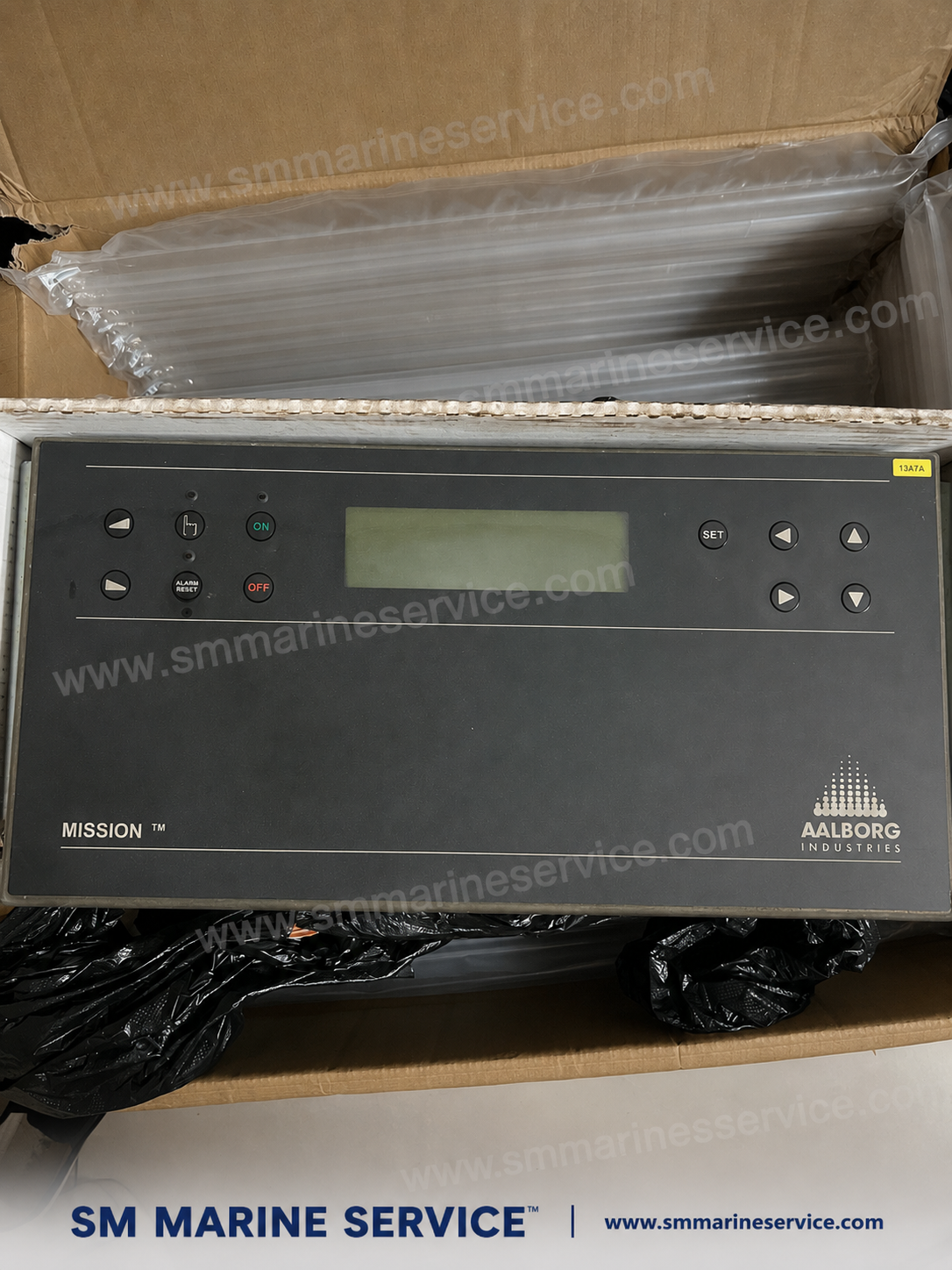
The equipment shown here is an Aalborg Industries MISSION™ boiler control panel, a dedicated marine boiler automation unit used for operating, monitoring, and protecting an Aalborg auxiliary boiler or mission boiler plant. On many ships, this panel is the operator’s main interface for boiler start/stop control, alarm reset, status indication, setpoint adjustment, burner sequence supervision, and boiler protection monitoring.
In practical shipboard service, this type of Aalborg MISSION control panel is more than a simple display. It is part of the boiler’s safety and operating logic, working together with pressure transmitters, water level devices, burner components, fuel valves, flame monitoring devices, pumps, and alarm circuits. If the control panel fails, the boiler may refuse to start, trip during operation, lose indication, or generate repeated safety shutdowns.
For this reason, marine engineers, ship managers, and purchasing teams often search not only for the complete Aalborg Mission controller, but also for display boards, CPU cards, keypad sections, power boards, relay outputs, burner interface boards, flame safeguard circuits, and replacement control modules.
What Is This Equipment?
The Aalborg MISSION™ boiler control panel is the operator and logic interface for an Aalborg marine boiler system. Depending on the exact boiler generation and control package, it may perform or supervise the following:
- Boiler start / stop command handling
- Burner automatic sequence control
- Steam pressure or hot water temperature related control commands
- Boiler alarm and shutdown management
- Water level supervision and safety interlocks
- Alarm acknowledgment and reset
- Setpoint entry and operating parameter adjustment
- Status indication for boiler running, standby, trip, alarm, and lockout conditions
- Communication with burner devices, sensors, switches, and output modules
In many Aalborg systems, the MISSION control platform is closely related to the boiler package and burner package, meaning the panel must be understood as part of the complete boiler automation system, not as a standalone generic display.
Where This Controller Sits in the Boiler System
A typical Aalborg mission boiler control arrangement may include:
- Main control panel / HMI / mission controller
- Burner sequence and flame safeguard logic
- Boiler pressure control loop
- Feedwater and low-water safety circuits
- Fuel oil pump / preheater / burner permissive logic
- Air fan / damper / ignition / flame monitoring chain
- Alarm and shutdown relay outputs
- Sensor inputs from pressure, temperature, level, and safety devices
So, when a vessel requests an Aalborg MISSION control panel, the real requirement may be one of several things:
- complete front panel
- main CPU control unit
- display module
- keyboard membrane / push-button assembly
- power supply board
- I/O module
- relay board
- burner control interface board
- complete tested replacement unit
That is why spare-parts-oriented identification is important when preparing quotations or repairs.
Main Features of the Aalborg MISSION Boiler Control Panel
Although exact functionality depends on boiler type and software version, Aalborg Mission boiler control panels are generally known for the following operational features:
1) Centralized Boiler Operation Interface
The panel gives engineers a single location for operating the boiler, checking status, viewing alarms, and resetting trips after fault investigation.
2) Burner Sequence Supervision
The control system manages or supervises the burner startup sequence, purge logic, ignition stages, flame establishment, and safe shutdown sequence.
3) Alarm and Shutdown Management
The panel typically interacts with boiler protection logic such as:
- low water level shutdown
- flame failure trip
- high steam pressure shutdown / control action
- fuel system fault
- fan / air pressure fault
- sensor failure or communication fault
- emergency stop / burner interlock activation
4) Operator Setpoint and Parameter Handling
Setpoints or operating parameters may be adjusted through the front keypad and display, depending on access level and control version.
5) Boiler Status Monitoring
The panel helps the engineer quickly identify whether the boiler is:
- ready for start
- in sequence
- running normally
- in alarm
- in lockout
- waiting for reset
- prevented from firing due to interlock failure
6) Marine-Specific Automation Design
Aalborg marine boiler systems are designed for shipboard operation where compactness, reliability, and safe automatic steam production are essential.
Additional Image Placement Suggestion
At this point in the WordPress article, insert:
- close-up image of the Aalborg Mission display and keypad
- rear or side image showing wiring / terminals if available
Main Components Associated with an Aalborg MISSION Boiler Controller
The exact internal structure varies by generation, but when shipowners or technical teams search for Aalborg Mission spare parts, they are usually referring to one or more of the following assemblies.
1) Front Operator Panel / Display Section
This is the visible interface containing:
- LCD or display window
- ON/OFF indicators
- alarm reset / acknowledge functions
- set button and navigation keys
- operating LEDs and annunciation points
2) Main CPU / Logic Board
The CPU or main control PCB handles:
- sequence logic
- input/output processing
- fault handling
- alarm logic
- burner operation logic
- operating parameter memory
3) Power Supply Section
The controller requires stable power for display, internal logic, and output circuits. Power board problems often cause:
- dead display
- intermittent reboot
- no response to buttons
- unstable alarm behavior
4) Input Circuit Section
Inputs may come from:
- pressure switches / transmitters
- water level devices
- low-water safety switches
- flame detector chain
- burner motor feedback
- fuel permissive contacts
- emergency stop and interlock circuits
5) Output / Relay Section
Outputs may command or interface with:
- burner motor starter
- fuel solenoid / valves
- ignition transformer
- alarm horn / lamp
- common alarm system
- boiler shutdown circuit
- remote monitoring system
6) Keypad / Membrane / Push-Button Interface
A faulty keypad can prevent:
- setpoint entry
- alarm reset
- start command
- navigation through menus
7) Communication / Interface Modules
Some systems use internal or external communication with other boiler control modules, alarm systems, or vessel automation networks.
Marine Applications
The Aalborg MISSION controller is associated with marine auxiliary boiler and fired boiler operation. Typical applications include:
- Auxiliary steam boilers on cargo vessels and tankers
- Mission boilers serving heating and service steam demands
- Boilers integrated with fuel heating, tank heating, and accommodation heating loads
- Boiler plants used during port stay or cargo heating operations
- Marine burner management and steam pressure control systems
- Boiler alarm and safety shutdown supervision
On ships with older Aalborg boiler installations, keeping the original control philosophy intact is often easier than redesigning the entire boiler automation system. That is one major reason these controllers remain in demand.
Additional Image Placement Suggestion
Here you can insert:
- boiler cabinet installation photo
- boiler control system internal board photo
- related Aalborg burner or control cabinet image
Common Problems & Troubleshooting
Because this panel is part of a live boiler control system, troubleshooting should always be done carefully and in accordance with shipboard safety procedures, boiler maker instructions, and class requirements. Below are common field issues seen with legacy marine boiler controllers.
1) Panel Does Not Power Up
Possible symptoms
- blank display
- no ON indication
- no response from keypad
- boiler cannot be started from panel
Possible causes
- no incoming supply to panel
- blown fuse or failed power supply section
- loose internal terminal connection
- damaged control PCB
- moisture ingress or corrosion
- defective display board
Checks
- verify incoming control power
- inspect panel fuse / PSU section
- check terminal tightness
- inspect for burnt components or capacitor failure
- verify DC outputs from internal power supply if applicable
2) Boiler Will Not Start from the Panel
Possible symptoms
- panel alive, but no burner sequence starts
- ON command accepted but boiler remains idle
- system shows standby only
Possible causes
- unfulfilled boiler permissive
- low-water or safety chain active
- fuel oil system not ready
- burner motor interlock fault
- alarm not reset
- flame safeguard lockout
- pressure or temperature logic blocking start
Checks
- confirm all permissives healthy
- inspect alarm memory / current alarm text if available
- verify burner reset status
- confirm feedwater and level safety devices are healthy
- verify fuel and combustion air system readiness
3) Repeated Boiler Trip / Alarm Lockout
Possible causes
- flame failure
- unstable ignition
- low water level trip
- faulty level switch or level probe signal
- pressure switch fault
- fan / airflow issue
- fuel pressure or atomization issue
- unstable power to controller
Checks
- identify first-out alarm if the controller provides sequence history
- inspect burner ignition and flame detector performance
- verify boiler water level safety chain
- check pressure switch calibration and contacts
- inspect burner fuel train and atomization condition
4) Display Works but Buttons Do Not Respond
Possible causes
- keypad membrane failure
- connector oxidation
- front PCB damage
- software freeze / internal logic fault
Checks
- test all keys individually
- inspect keypad ribbon / connector
- power cycle only according to safe procedure
- compare with known healthy panel if available
5) Alarm Cannot Be Reset
Possible causes
- active trip condition still present
- burner lockout not cleared
- low-water safety still active
- flame safeguard reset required at burner side
- defective alarm reset switch / button
- output relay or internal latch fault
RELATED MARINE BOILER CONTROL COMPONENTS
For complete marine boiler automation, burner management, flame monitoring and water-level control applications, explore our related components: SAACKE Feuerungsautomat F-OSA Burner Control Unit, SAACKE T ID Burner Control Unit, GESTRA NRS 1-7 Water Level Controller, GESTRA NRS 1-50 Level Switch Controller, and SAACKE FLUS 06 UV Flame Scanner.
SM MARINE SERVICE™
Marine Automation & Navigation Equipment Supplier
Available Condition:
• New Equipment • Used Equipment • Refurbished Equipment • Reconditioned Equipment
Stock Location:
• Bangladesh • China
Services:
• Worldwide Shipping • Technical Support • Spare Parts Supply • Marine Equipment Sourcing
Contact Information
SM MARINE SERVICE™
Samir Market, DT Road, Pahartali, beside CDA Market, Chattogram, Bangladesh
Mobile / WhatsApp / Viber: +88 01818 929292
Email: info@smmarineservice.com
Website: www.smmarineservice.com